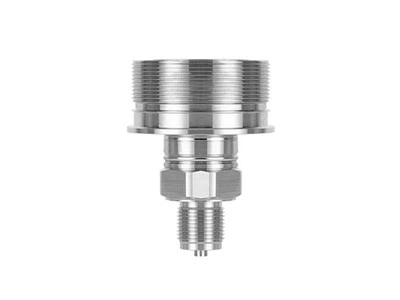
Hey there! If you're looking to install a digital pressure switch in your boiler, you've come to the right place. I'm a supplier of digital pressure switches, and I'm here to walk you through the process step by step.
Why You Need a Digital Pressure Switch in Your Boiler
First off, let's talk about why a digital pressure switch is so important for your boiler. Boilers operate under specific pressure conditions, and maintaining the right pressure is crucial for their safe and efficient operation. A digital pressure switch helps you monitor and control the pressure inside the boiler. It can automatically turn the boiler on or off when the pressure reaches a certain setpoint, preventing over - pressure or under - pressure situations that could lead to damage or even safety hazards.
Choosing the Right Digital Pressure Switch
Before you start the installation, you need to choose the right digital pressure switch for your boiler. There are different types and models available, each with its own features and specifications. For example, the PS131 - TSR Gauge Pressure Switch is a great option for many standard boiler applications. It offers accurate pressure measurement and reliable switching performance.
If you have a more complex boiler system or need higher precision, you might consider the PS858 - TSR - S Gauge Pressure Switch or the PS858 - TSR - S Gauge Pressure Switch. These switches come with advanced features like adjustable setpoints and digital displays, which allow you to fine - tune the pressure control according to your specific needs.
Tools and Materials You'll Need
Once you've chosen the right digital pressure switch, it's time to gather the tools and materials you'll need for the installation. Here's a list:
- Digital pressure switch
- Wrenches (appropriate sizes for your boiler's pipes)
- Sealant tape (to prevent leaks)
- Electrical wires (if required for the switch's power supply)
- Screwdriver
- Multimeter (to test the electrical connections)
Installation Steps
Step 1: Turn Off the Boiler
Safety first! Before you start any work on your boiler, make sure to turn it off and let it cool down completely. This will prevent any accidental burns or electrical shocks.


Step 2: Locate the Pressure Tap
The pressure tap is the point on the boiler where you'll connect the digital pressure switch. It's usually a small pipe or fitting that allows you to access the pressure inside the boiler. Refer to your boiler's manual to find the exact location of the pressure tap.
Step 3: Prepare the Pressure Tap
Use a wrench to loosen the fitting on the pressure tap. Wrap some sealant tape around the threads of the tap in a clockwise direction. This will help create a tight seal when you connect the pressure switch.
Step 4: Connect the Digital Pressure Switch
Take your digital pressure switch and carefully screw it onto the pressure tap. Use a wrench to tighten it securely, but be careful not to over - tighten, as this could damage the switch or the tap.
Step 5: Electrical Connections (if applicable)
If your digital pressure switch requires an electrical power supply, you'll need to make the necessary electrical connections. First, turn off the power to the area where you'll be working. Then, use a screwdriver to open the switch's electrical compartment. Connect the electrical wires according to the switch's wiring diagram. Make sure the connections are tight and insulated to prevent any short circuits.
Step 6: Test the Connections
Once you've made all the connections, use a multimeter to test the electrical connections. Check for continuity and proper voltage levels. If everything looks good, you can proceed to the next step.
Step 7: Set the Pressure Setpoints
Most digital pressure switches allow you to set the pressure setpoints, which are the pressures at which the switch will turn on or off. Refer to the switch's manual to learn how to set the setpoints. You can usually use the switch's buttons or a digital display to adjust the values.
Step 8: Turn On the Boiler
After you've set the pressure setpoints, it's time to turn on the boiler. Monitor the pressure readings on the digital pressure switch to make sure it's working properly. Check for any leaks around the pressure switch and the connections. If you notice any problems, turn off the boiler immediately and troubleshoot the issue.
Troubleshooting Tips
- Leaking connections: If you notice any leaks around the pressure switch or the connections, turn off the boiler and tighten the fittings. You may also need to add more sealant tape.
- Incorrect pressure readings: If the pressure readings on the digital pressure switch are incorrect, check the setpoints and make sure they're set correctly. You may also need to calibrate the switch according to the manufacturer's instructions.
- Electrical problems: If the switch isn't working or there are electrical issues, check the electrical connections and make sure the power supply is working properly. You may need to consult an electrician if you're not comfortable working with electrical systems.
Conclusion
Installing a digital pressure switch in your boiler is a relatively straightforward process if you follow the steps carefully. By choosing the right switch and following the proper installation procedures, you can ensure that your boiler operates safely and efficiently.
If you're interested in purchasing a digital pressure switch for your boiler or have any questions about the installation process, feel free to reach out. We're here to help you find the best solution for your needs and provide you with top - quality products.
References
- Boiler manufacturer's manual
- Digital pressure switch manufacturer's manual